服务器配置,外网访问mySql
windows 服务器
设置MySQL服务允许外网访问
-
修改mysql 配置文件
my.ini-
文件位置
C:\Program Files\MySQL\MySQL Server 5.1\my.ini对应自己安装mysql位置 -
找到
[mysqld]和port=3306在下面添加bind-address=0.0.0.0如下:[client] port=3306 [mysql] default-character-set=UTF8 # SERVER SECTION # ---------------------------------------------------------------------- # # The following options will be read by the MySQL Server. Make sure that # you have installed the server correctly (see above) so it reads this # file. # [mysqld] # The TCP/IP Port the MySQL Server will listen on port=3306 # 新添加的 bind-address=0.0.0.0 #Path to installation directory. All paths are usually resolved relative to this. basedir="C:/Program Files/MySQL/MySQL Server 5.1/"
-
-
重启
mysql服务
     > net stop mysql
     > net start mysql
设置mysql用户支持外网访问
需要使用root权限登录mysql,更新mysql.user表,设置指定用户的Host字段为%,默认一般为127.0.0.1或者localhost。
% 允许从任何ip登录 x.x.x.x 允许从指定ip访问
-
登录数据库
找到目录
C:/Program Files/MySQL/MySQL Server 5.1/bin在这个目录下执行命令
mysql -u root -pC:\Program Files\MySQL\MySQL Server 5.1\bin> mysql -u root -p然后输入密码
输入密码后执行命令
注意命令以分号结束
mysql> use mysql;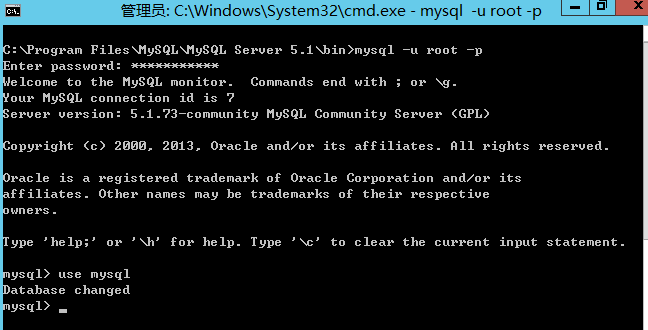
-
查询host
mysql> select user, host from user;
-
创建host
如果没有”%”这个host值,就执行下面命令
mysql> update user set host=’%’ where user=‘root’; mysql> flush privileges; -
授权用户
-
任意主机以用户root和密码
password连接到mysql服务器mysql> GRANT ALL PRIVILEGES ON *.* TO 'root'@'%' IDENTIFIED BY 'password' WITH GRANT OPTION; mysql> flush privileges; -
固定IP 192.168.1.1 账号:userName,密码:password
mysql>GRANT ALL PRIVILEGES ON *.* TO 'userName'@'192.168.1.1' IDENTIFIED BY 'password' WITH GRANT OPTION; mysql>flush privileges;
-
整体命令如下
bin>mysql -u root -p
Enter password:*********
mysql> use mysql;
mysql> update user set host=’%’ where user=‘root’;
mysql> flush privileges;
mysql> GRANT ALL PRIVILEGES ON *.* TO 'root'@'%'  IDENTIFIED BY 'password'  WITH GRANT OPTION;
mysql> flush privileges;